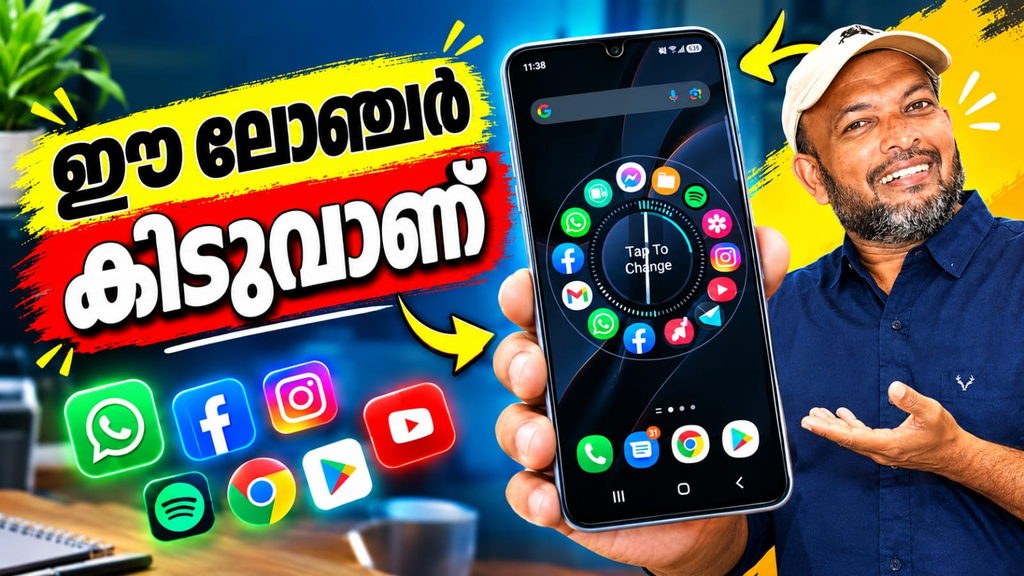
Want to give your Android phone a fresh and creative appearance? Nocebo Launcher offers a different way to organize and access your apps. Instead of using a traditional grid of icons, it introduces a rotating home screen designed for smooth navigation, personalization, and convenient everyday use.
What Is Nocebo Launcher?
Nocebo Launcher is an Android personalization app developed by Nocebo. It transforms the standard home screen into an interactive interface with a spinning layout. Users can customize its appearance, organize applications, and adjust different settings according to their preferences. It is suitable for people who enjoy experimenting with unique home screen designs.
Key Features of Nocebo Launcher
1. Interactive Spinning Layout
The main highlight is its rotating app layout. Users can move through their applications using a spinner-style interface rather than relying entirely on conventional icon grids. This distinctive design also aims to make frequently used apps easier to reach.
2. Customizable Center Sticker
Nocebo Launcher allows users to personalize the center of the spinning interface with a sticker. This feature adds a personal touch and helps create a home screen that reflects individual tastes.
3. Dynamic App Drawer
The app drawer provides tools for organizing applications. Users can sort apps through drag-and-drop controls, create custom folders, and integrate widgets. These options help maintain a more organized mobile experience.
4. Flexible Customization Options
Users can adjust different aspects of the interface to create a minimalist appearance or a more detailed setup. Customization makes the launcher suitable for people who prefer experimenting with layouts and visual styles.
5. Gestures and Screen Controls
The launcher offers gesture-related options that can make navigation more convenient. Some configurations support system actions, such as turning off the screen through gestures. Certain functions may require optional permissions.
Benefits of Using Nocebo Launcher
Nocebo Launcher provides an alternative to standard Android home screens. Its rotating layout creates a distinctive visual experience, while folders and app organization tools help users manage their applications. The customizable interface also allows users to create a setup that suits their daily habits.
The spinner design may be especially appealing to people who prefer interactive navigation and want to explore something different from conventional launchers.
Privacy and Permissions
According to its Google Play listing, the developer declares that the app collects no data and shares no data with third parties. Accessibility Service permission may be needed for selected gestures, while Device Administrator permission is optional and disabled by default. Users should review permission requests before enabling additional functions.
Nocebo Launcher is an interesting choice for Android users who want a creative, customizable home screen. Its spinning layout, center stickers, app drawer organization, and gesture controls make it stand out from traditional launchers. If you enjoy personalizing your phone and trying new navigation styles, Nocebo Launcher is worth exploring.
Nocebo Launcher, Android launcher, spinning home screen, Android customization app, customizable launcher, app drawer, Android personalization, unique home screen design